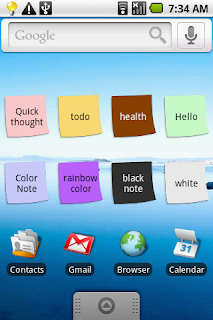
Q : How do you put a sticky note on the home screen?
A : Goto home screen and long press empty space and choose widget, ColorNote will be there for sticking on page. http://www.youtube.com/watch?v=DpMLF9b2aTQ See this youtube video to learn about the home screen widget.
Q : How come the widget and the alarm and remider functions don't work?
A : If the app is installed on the SD card, your widget, reminder and etc. will not work properly because Android doesn't support them! If you have already moved app to SD card, but you want those features, you have to move it back to device and reboot you phone.
Settings - Applications - Manage Applications - ColorNote - Move to Device
Settings - Applications - Manage Applications - ColorNote - Move to Device
Q : Where are 'Archive' and 'Recycle Bin'?
A : Click 'ColorNote' on top left of the main screen.
Q : I had to reinstall color note and there is an automatic backed up data that was stored but it requires a password and I hadn't set one up in the past. How do I retrieve that information?
A : Try default password '0000' (numbers)
Q: How do you back up the notes?
A: Goto backup screen 'Menu-BackUp' , tap backup button, and enter your master password.
Q: How do you restore backed up data on SD card?
A: Goto backup screen 'Menu -> BackUp -> SD card backup' then you can see list of backup files. Tap backup item you want to restore. Type password that you have set when backup file was created. The password is same as the password for lock notes.
Q: Where is backed up data at?
A: /data/colornote/backup on sdcard (/sdcard/data/colornote/backup)
A: /data/colornote/backup on sdcard (/sdcard/data/colornote/backup)
Q: I forgot my password, how can I change it?
A: Menu -> Settings -> Master Password -> Menu Button-> Clear Password.
!! You will lose current locked notes when you clear password.
Q: I don't remember my password to restore backed up data. Any help?
A: It can't be restored if you don't know the password.
Q: How to move up & down a checklist item?
A: Touch left icon and drag to move it. If drag & drop doesn't work, Settings -> Advanced Settings -> Turn off 'List item drag and drop'
Q: ColorNote is stuck in an "Installing" state. I can not update it or reinstall it.
A: That seems the market app problem. Go to Settings-->Applications-->Manage applications-->Market and clicked on 'clear data' or Go to Settings -> Applications and deinstall the Market update. -> Clear the Market's cache and data. https://market.android.com/support/bin/answer.py?hl=en&answer=1067233&topic=1100168